zondag 16 juni 2013

Prusa Mendel RepRap build, day x...y...z

It has been a while since I blogged about my Prusa Mendel RepRap build.

Basically it boils down to a serious lack of free time and when I had time to work on my Prusa Mendel, it did not leave me enough time to blog about it.

The good news?  Well it's working!!!!!!!


The bad news? Well it took me a long time to finish it :-)  For the remainder of the post I'll try to list tips & tricks that were useful to me.

Build weekend

I say the most helpful thing for me to finish this project was going to a RepRap build weekend.  This was hosted at the Ghent fablab Timelab. A build weekend has the advantage that you either get to work on your own or someone else his RepRap.  It is a place were a lot of people are working on the same thing and thus encounter the same or similar problems.  There are also always people present that can provide you with technical help, tips and tricks.

In my case, I went there to help build someone else his RepRap. This greatly sped up his build as I was already familiar with the construction of the mechanical parts.  On the other hand it, I got stuck during wiring of my RepRap.  During the build weekend I got confirmation that the way I wired up everything till that moment was valid and got a heads up on the testing and calibration phases following the wiring of the Prusa Mendel.

Wiring diagram

A big help during the wiring of my RepRap was the following wiring schema:
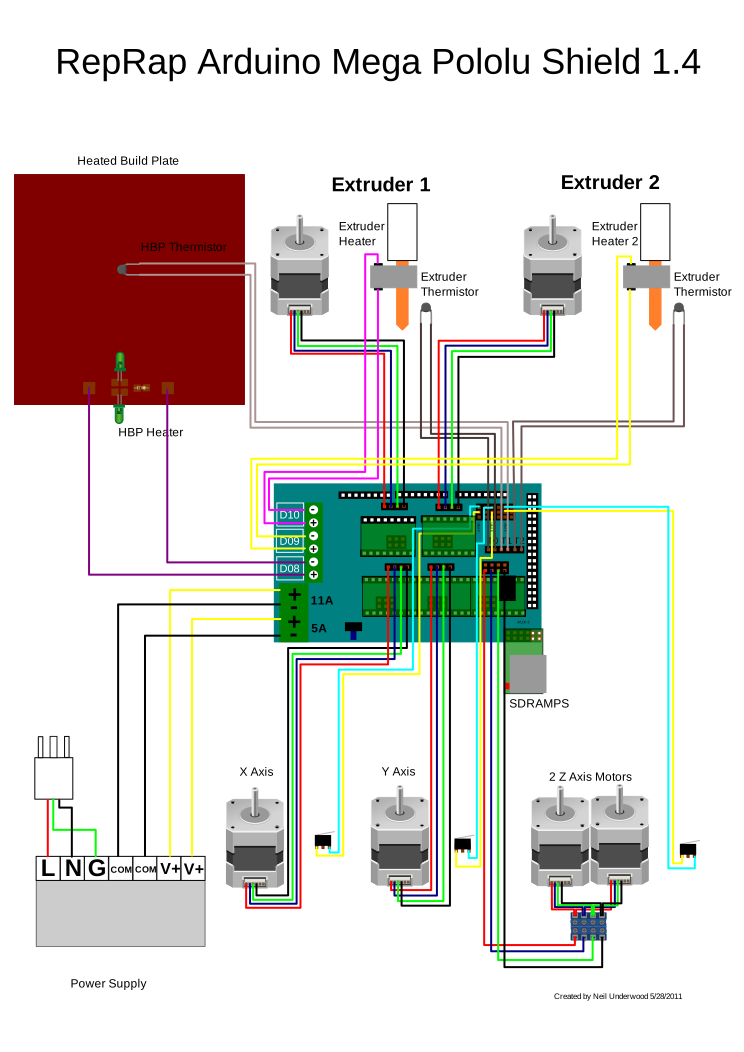
This provides you with all detail required to connect your components to the ramps 1.4 board.

Wiring

Ramps board mounting

One big factor during wiring is deciding where you are going to mount your electronics. In my case, due to the fact that I didn't have a lot of cabling laying around I decided to mount the electronics on top as this causes me to extend the least amount of cables to connect to the ramps board.

Basically not such a good idea. As the preferred location for the PLA/ABS spool is .... on top of the prusa mendel.  So now it is just plain in the way.

Wires to use

Next, invest in the appropriate wiring to to wire up your components to your board.  In a rush to get my RepRap build, I went to a local hardware store and bought a few meters of stereo cable.  Although conducting well enough, it caused some connectors to detach themselves as the wires weighed too much.

Just the extra effort of looking for 'ramps 1.4 wiring kit' on ebay and some waiting would have saved me a lot of frustration and would have caused me not to end up with a frankenstein build.  My next item on my todo list is actually repositioning the arduino with ramps board and rewiring everything using this wiring kit.

Power

You actually need to attach all power connections to the Ramps board.  If not you'll spend an entire evening trying to figure out why some parts of your printer work fine while other parts don't.

Getting to print

I tried out my printer with some calibration files that I downloaded from the internet.  I slice them using Cura and then load the gcode files in Pronterface and print them there.

One thing that clearly helped getting a better success to failure ratio is to lower the speed dramatically.  Remember, hich speeds might cause your belts to slip, which in turn will cause failed prints.

DIY belt tensioner

Due to the length of my build and after first usage there seemed to be too much slack on my belts.  The belt of my X-axis was no problem as I can easily reach the clamps and adjust them en the tension on the belt.  However, the Y-axis was a pain.  I am no longer able to reach the clamps and I was not looking forward to unassembling, reassembling and recalibrating the heated print bed.  Therefore I decided to employ a belt tensioner.  Trying to print one failed twice (due to slack belt) so I decided to put one together myself.


Every print an adventure


I must say that till now, each print is an adventure.  You get your hopes up after each successfull print, followed by crushed hopes due to a failure on you next print.  Never think you are finished tuning this machine.

Double check


Regularly check your printer structure.  On 2 occasions I had parts of my printbed and extruder coming slightly apart (no major disasters, but anyway).  Some parts of the printer are under a lot of stress or get shaken a lot so trembling can unmake your printer :-)

Previous post regarding my Prusa Mendel Reprap build:
Prusa Mendel RepRap build,day 1
Prusa Mendel RepRap build, day2
Prusa Mendel RepRap build, day 3
Prusa Mendel RepRap build, day 4 & 5
Prusa Mendel RepRap build, day 6
Prusa Mendel RepRap build, day 7
Prusa Mendel RepRap build, day 8


vrijdag 21 december 2012

Prusa Mendel RepRap build, update

Today I finally received my Chinese power supply for the RepRap.  Now I can finally continue my build. Although, due to the holidays and family visits that might only be Tuesday evening the earliest.


Merry X-mas and Happy New year everyone.

dinsdag 11 december 2012

Prusa Mendel RepRap build, day 8

Yesterday I recieved 2  extra belt clamps from the people from reprap france where I bought my kit.   I fabricated my own belt clamps out of thin MDF but they seemed too flimsy for usage.  So after explaining my problem they were willing to send me these two clamps for free.

So I mirked the holes of the clamps on the base plate using a drill bit, before drilling the actual holes.  Be sure to double check these as one pair of holes were incorrectly marked, so now I have 6 holes in my base plate :-) (you can see them below the nearest belt clamp)


So after the Y-axis belt was fixed I could finally install the print bed.

Not that much progress, but I'm currently reading up on how to mount the heated PCB for the print bed.  I already have the glass plate laying around, but it seems that ideally I still require some insulation between the current print bed and the heated PCB.  Also, it is still not clear to me how to install the thermistor for the heated PCB and how to wire it up.

I also will still need to mount the hot end into the extruder and wire up the leads of the hot end thermistor and the heater resistor.

Once these to steps are done I can start mounting the end stops en connect the electronics.  Status so far:


woensdag 5 december 2012

Prusa Mendel RepRap build, day 7

I mounted the extruder on the X- carriage and installed the belt for the X-carriage.


Today I tackled the assembly of the J-Head mk-V hot end.  This alreaday came preassembled, but it still requires installing the heater resistor and thermistor.


I have been going over the documentation in the reprap wiki  a few times, just to be sure.  I just tried to see if the heater resistor fits the destined hole.  I was a tight fit and with some light pushing found that the resistor got stuck on one side.


As the Heater resistor wouldn't budge anymore I applied some more force and eventually got the resistor to be at the center of the hole.  Due to the tight fit I guess I won't need muffler repair putty or aluminium foil to make the fit.


I then installed the thermistor and slid the insulation tubing over the leads.


As the thermistor can move freely I fixed it to the hot end with some kapton tape.  I also bent the leads slightly to allow it to be connected to the Reprap electronics.


Does the hot end work?  Well we will have to wait until the power supply arrives.  Also still need to install the hot end in the extruder.  But that's for another day.

maandag 3 december 2012

Prusa Mendel RepRap build, day 6

I put some glue super glue on the part that snapped and I used a reshaped packaging staple from some cardboard box in an attempt to make the snapped part even sturdier.

While I was gluing, I also attached the base plate to the Y-axis support. and left these to dry.

In the mean time I attached the X-axis threaded rods to the stepper motors on top of the Reprap with some aluminium couplers.

After the glue dried, I aligned the Y-axis belt on the base platform.  I went looking for the belt clamps so I could mark the holes that needed to be drilled in the base platform.  The bag containing all 3D printed parts contained 3 belt clamps and 2 remaining rod clamps.

This is enough for attaching the Y-axis belt to the base platform, but I need 4 in total as I also need 2 belt clamps on the X-axis.  The holes in the rod clamps to not line up to the holes of the belt clamps. I guess I'll keep the best belt clamps for the X-axis belt and either fabricate my own Y-axis belt clamps from some thin MDF or use the rod clamps turned upside down.

At this point I tightened up the complete frame, until now I hand tightened everything.  It's slightly unnerving to hear light pinging noises as the plastic printed parts have to deal with some real pressure :-)

Now I left the frame of the Reprap to start work on the wade extruder.  This extruder was also printed slightly sturdier than the original one.  So, again I had to use the M3x16 bolts instead of the supplied M3x10 bolts.  And as before, I also needed to use the nut-spacer trick to safely attach the motor to the extruder component.


The nut-spacer trick is also working for the extruder-motor connection situated under the big cog.  There is still enough room between the bolt head and the cog.


I probably have to slow down a bit, as only this weekend I ordered my Chinese power supply for the Reprap and I suppose I shouldn't expect it at my doorstep tomorrow. So far for build day 6 :-)


zaterdag 1 december 2012

Prusa Mendel RepRap build, day 4 & 5

Day 4

No english version of the eMotionTech Prusa precision kit exists, just a french and spanish version.  So I'm trying my best with the french version (luckely this is the 3rd language I know, but the technical french vocabulary is quite unknown to me)

When mounting the supports for one of the plates (the 4 supports are in front of the Prusa frame in previous post) I saw the bolts could not pass the threaded rod connecting the side triangles on the bottom.  That's because the rod needed to be mounted below the bottom-side threaded rods instead of on top of it. Thanks for the people of eMotionTech to help me out on this (although I found out myself before I got there answer back).  Just shows I really should stick to the french version of the manual :-)

I don't have super glue laying around, so I cannot fix the base plate to the supports.

The second hurdle was mounting the Y-axis motor to the Y-motor bracket.  Apparently this is an updated bracket compared to the stock one.  It's much sturdier.  Unfortunately there aren't any longer bolts left to spare in the kit. So this concluded day 4 of the construction.


Day 5

I bought some M3x16 bolts (the only M3 bolts I could find) in the hard ware store so I could mount the Y-axis motor.  Although I forgot to purchase some super glue.

Unfortunately these bolts are about 2 mm too long.  I solved this by placing an M3 nut between the washer and the head of the bolt.

I could now continue building the X-axis parts.  You need M3x16 bolts for this to, so I'm glad I bought some extras to day :-) .  All went well until I applied some pressure on the left side component when pushing the slide rods through.  I heard a crack and the mounting bracket for the motor cracked.  Guess I will need that super glue even more now :-(


2 of the mounting point are still good, so after gluing that part, I guess all will be well.

I mounted the X-axis construction into the frame and mounted the motors on top of the frame.  So that concludes build day 5 :-)


woensdag 28 november 2012

Prusa Mendel RepRap build, day 3

Tightened the complete frame, added the bottom threaded rod (so part 5 of the manual is finished) and started on the Y-axis (part 6 of the manual):


I just found out the eMotionTech manual is slightly different (at least for the Prusa Mendel Precision kit I ordered) from the online Prusa Mendel Visual instructions.  Unfortunately it's in french, I'll see if I can track down the English version.